Made by Jetnipat

Software for Industrial Data

Software we build to read, record and manage data from energy meters, sensors and Modbus devices — from a field engineer's toolkit to a full energy management system.

Our Software JETNIPAT Energy Modbus Studio Packages FAQ Contact Us
Our Products

Two Programs, One Goal: Make Your Data Useful

Choose the one that fits the job — or use them together.
JETNIPAT Energy screenshot
Energy management software

JETNIPAT Energy

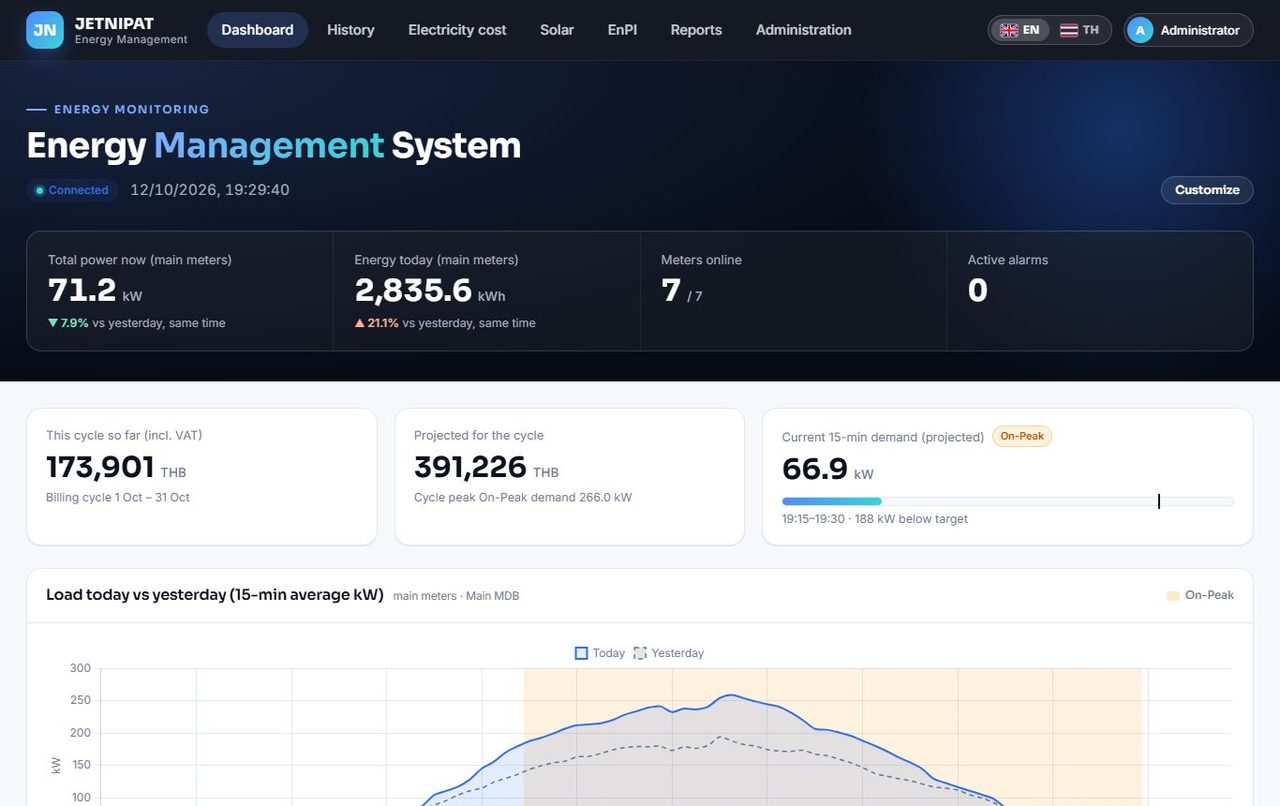
A web-based system that reads many meters at once, then shows live values, electricity cost and demand, solar, reports and alerts.

Modbus RTU / TCPTOU cost & DemandPDF / Excel reportsLINE / Telegram alerts
View details
Modbus Studio screenshot
Modbus toolkit for engineers

Modbus Studio

A Windows program to scan, read, write and log Modbus TCP and RTU devices — with a simulation mode to try it without hardware.

Scan TCP / RTURegister mapData loggerMQTT gateway
View details
JN
Energy management software

JETNIPAT Energy

See where your electricity goes. JETNIPAT Energy reads your meters over RS-485 or the network, keeps the history on your own server, and turns it into live dashboards, electricity-cost estimates, reports and alerts you can open from any browser on your network.

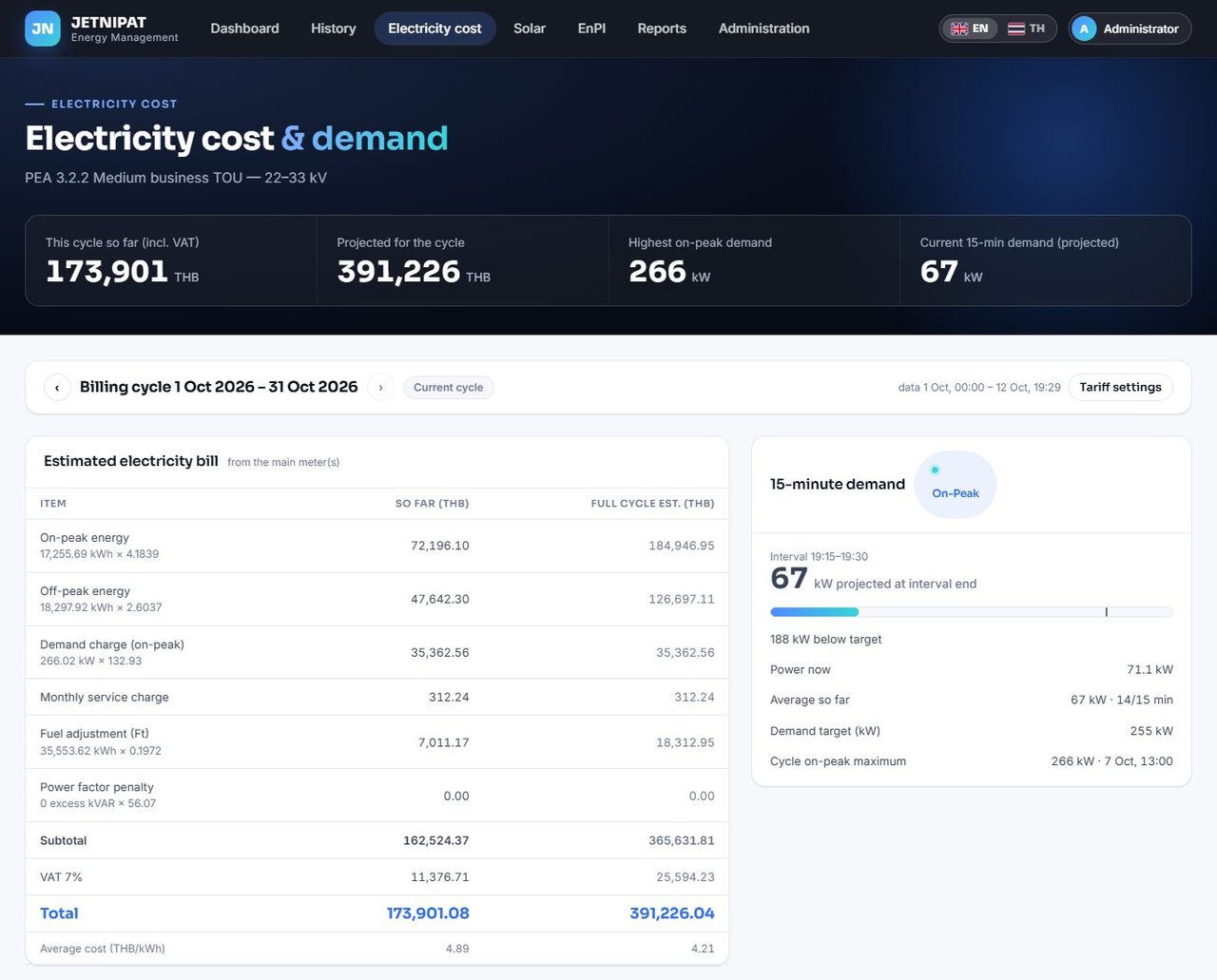
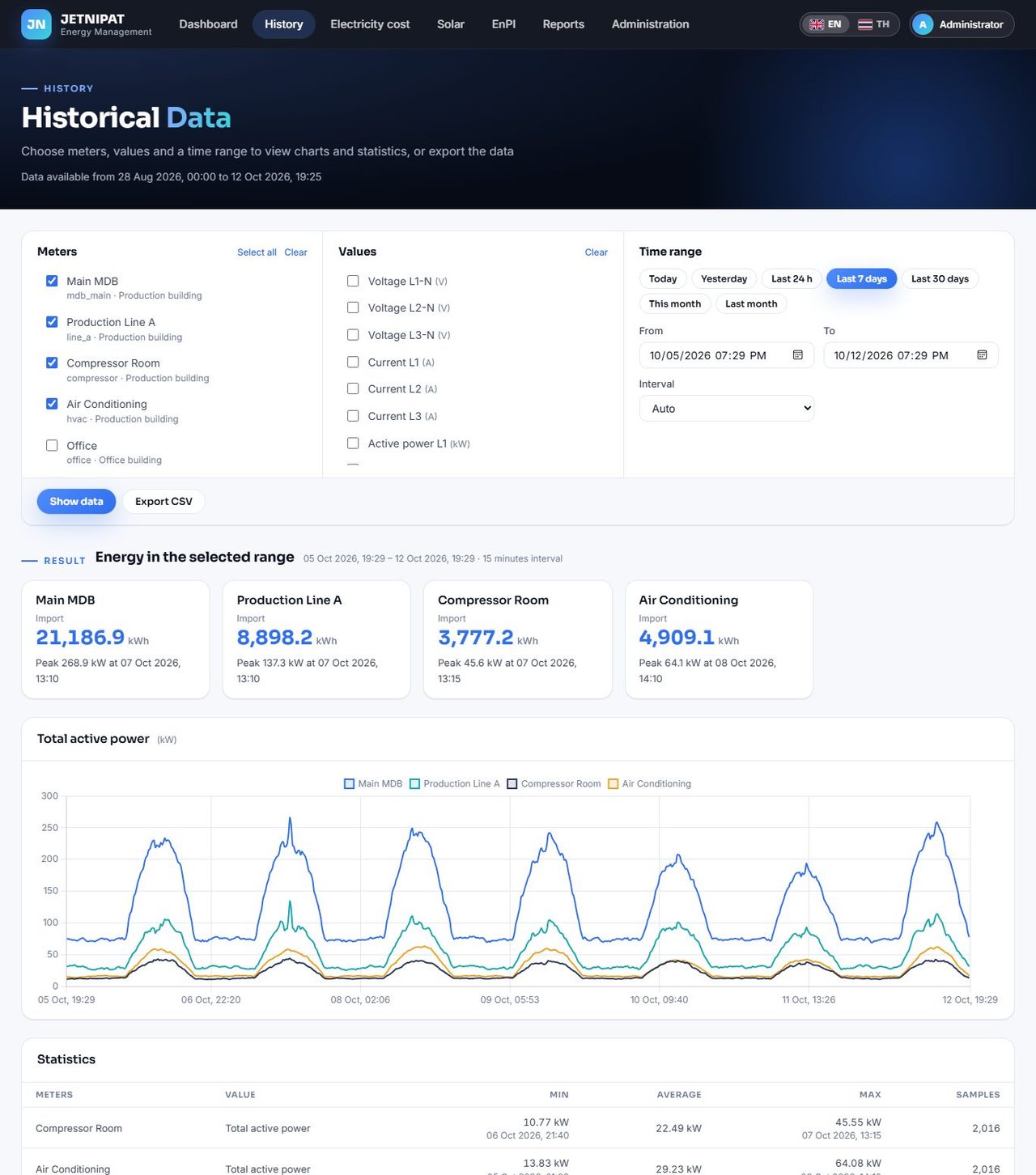
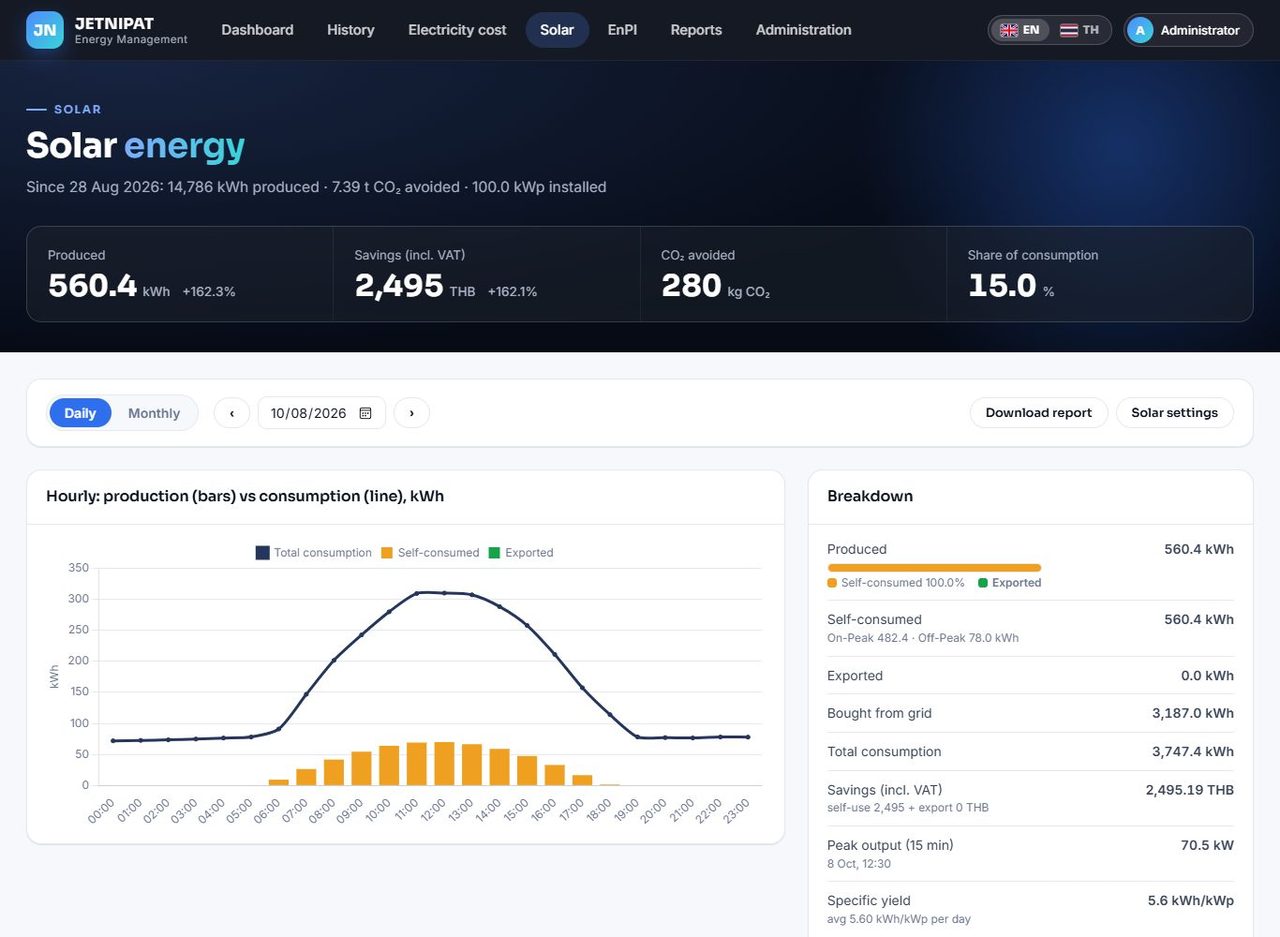
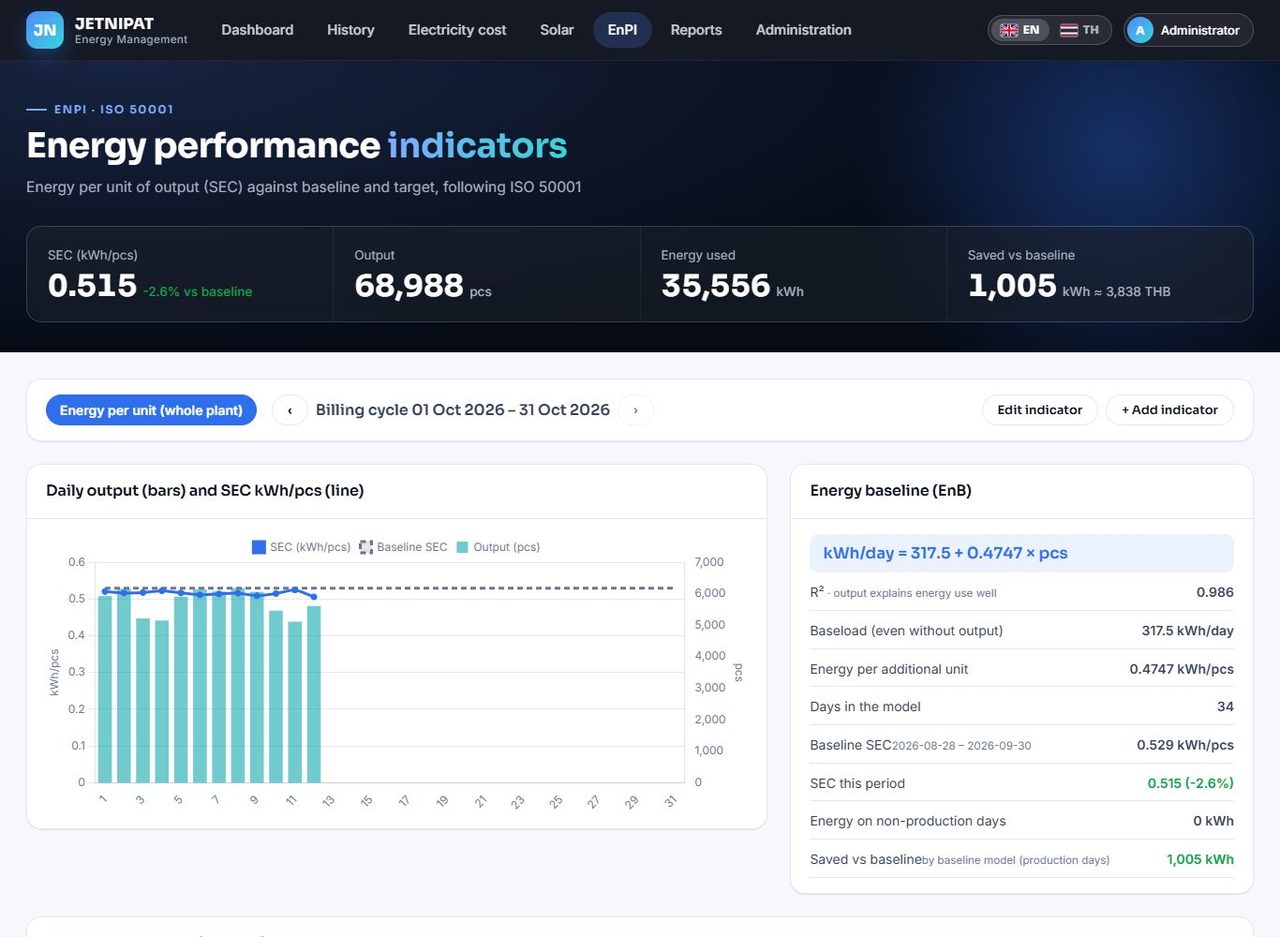
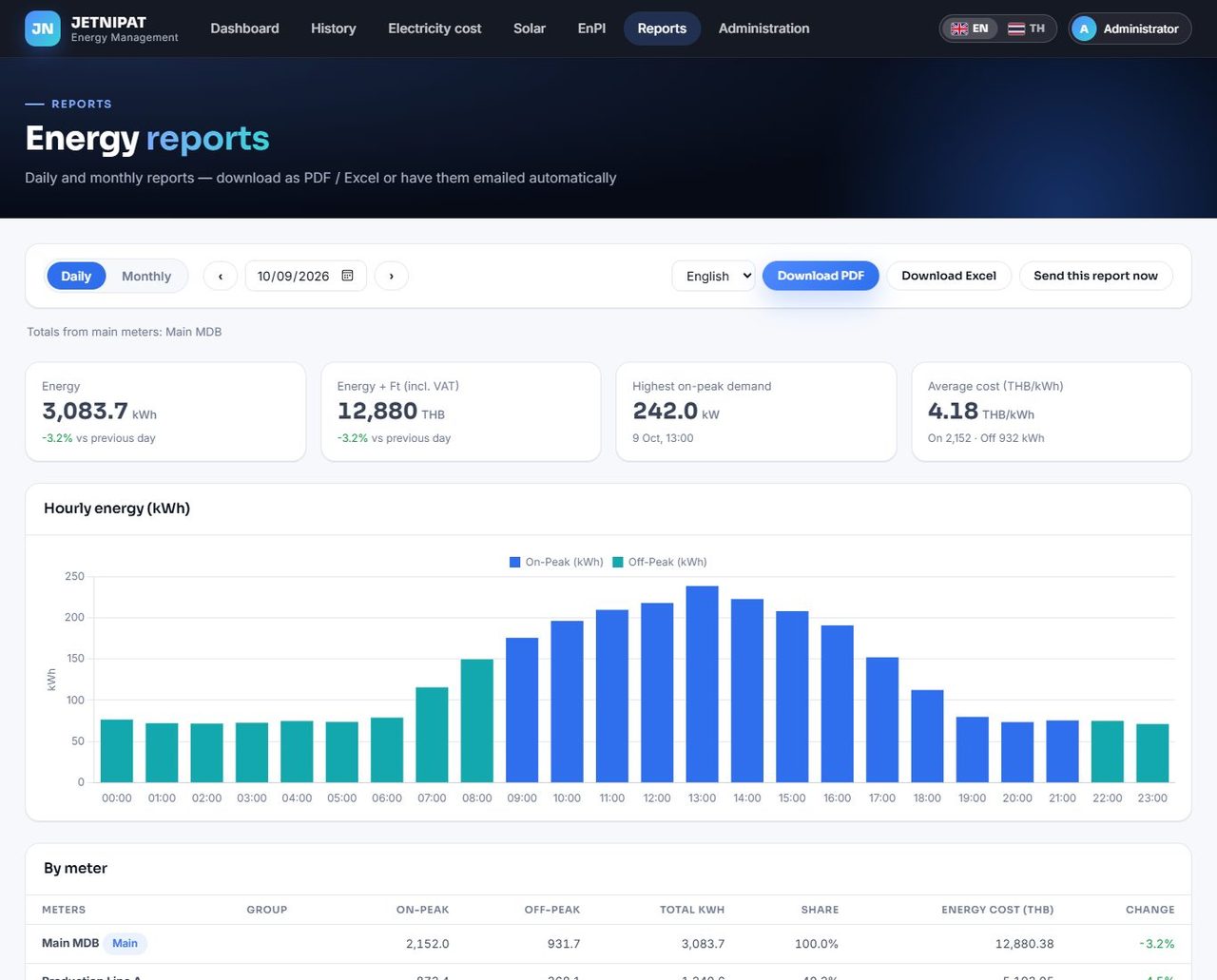
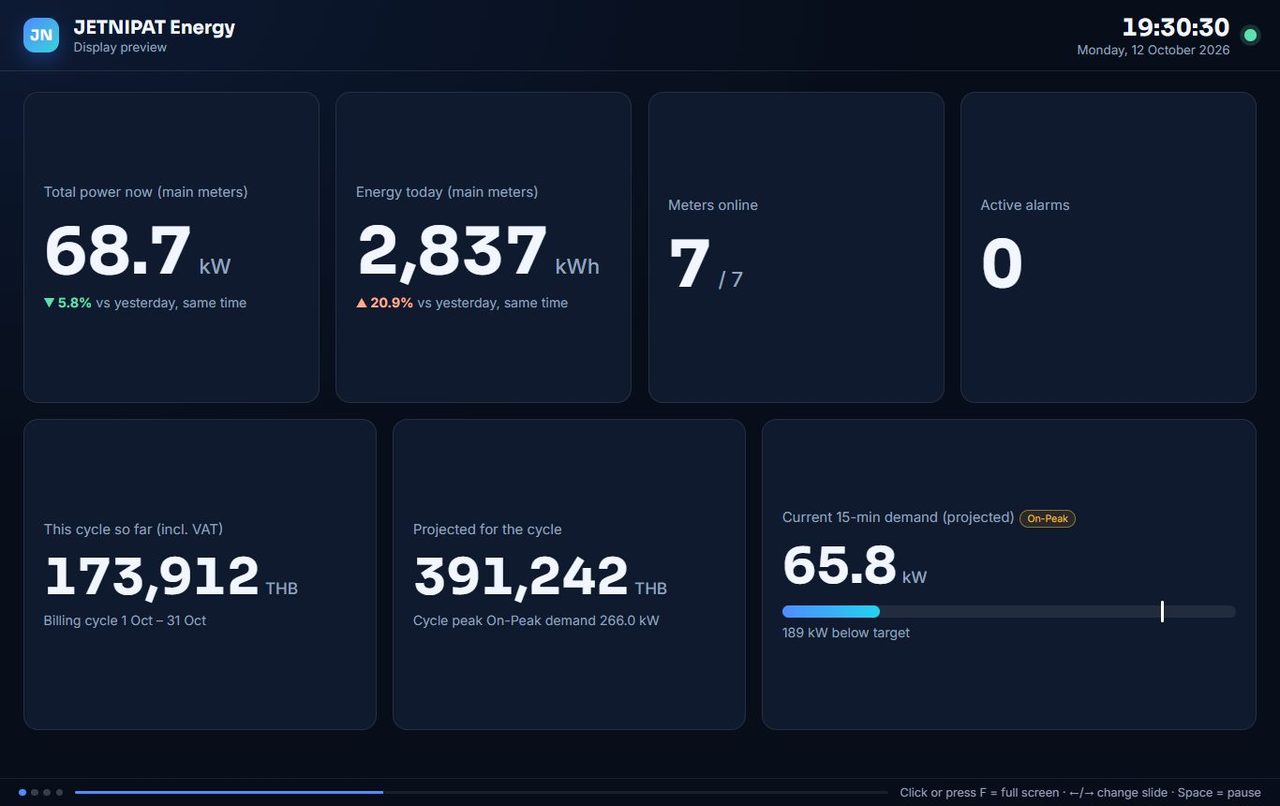
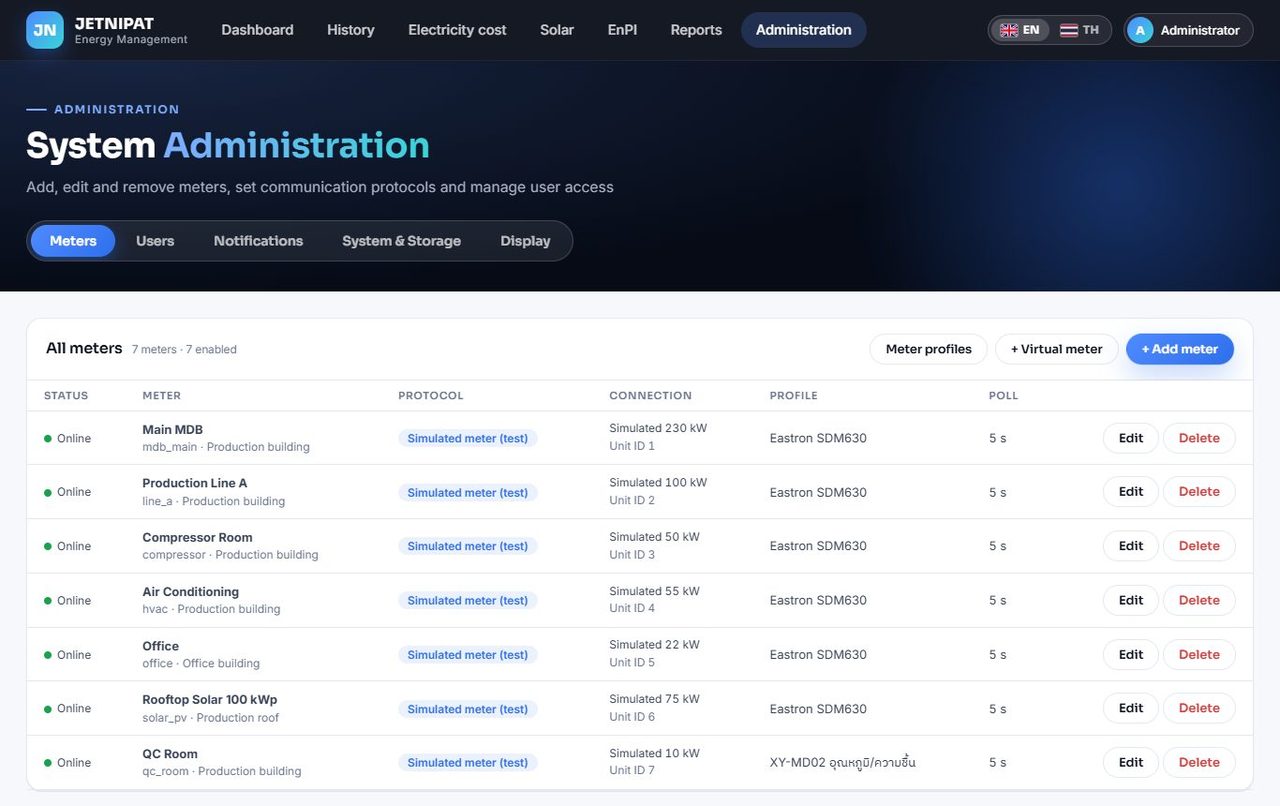
Screenshots show sample data from a demo plant.

Live monitoring of many meters

Reads many meters over RS-485, Modbus TCP or a gateway at the same time. Meters on one RS-485 line take turns automatically.

Electricity cost and Demand

Estimates the PEA TOU bill so far and for the whole cycle, tracks 15-minute demand against your target and warns before it is exceeded. Rates are editable.

History and comparison

Pick meters, values and periods, compare meters side by side, see peaks with the time they happened, and export CSV.

Alerts where you already are

Alerts by LINE, Telegram and email when a value goes out of range or a meter goes offline, with a daily energy summary.

Reports on a schedule

Daily and monthly PDF / Excel reports, sent automatically by email, LINE or Telegram.

Solar tracking

Production, self-use, export, baht saved and CO₂ avoided — included in the reports.

EnPI and savings

Energy per unit produced, baseline model and cumulative savings — a practical tool for energy-management programs.

TV display

Rotating full-screen pages for a TV or control room. Screen links are view-only and can be revoked at any time.

Any Modbus meter

Ready-made profiles for common meters, and a web editor to add other models from the manual's register map — with a test read before you save. Virtual meters add or subtract meters (whole plant, department, unmetered load).

Connects to
Modbus RTU, ASCII, TCP and RTU-over-TCP (RS-485 gateways)
Runs on
Windows (installer) · Linux / Raspberry Pi
Your data
Stored on your own server in a single local database file, with automatic backup
Access
Any browser on your network · Thai and English · admin and viewer users
MS
Modbus toolkit for engineers

Modbus Studio

Everything a field engineer needs to talk to a Modbus device: find it, read its registers, convert the numbers, log them and forward them to the cloud. Works on a laptop with no internet and no monthly fee.

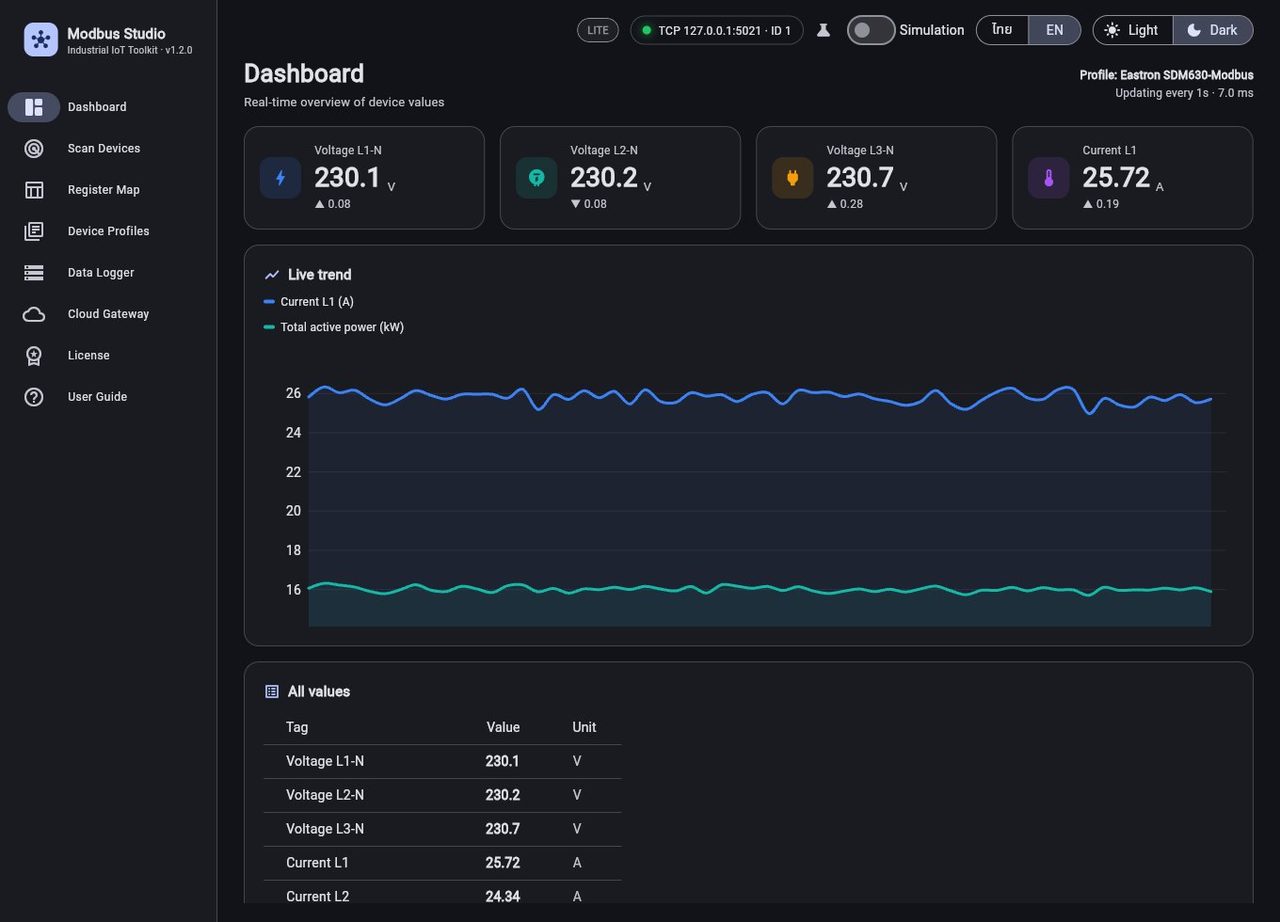
Screenshots show a simulated three-phase meter.

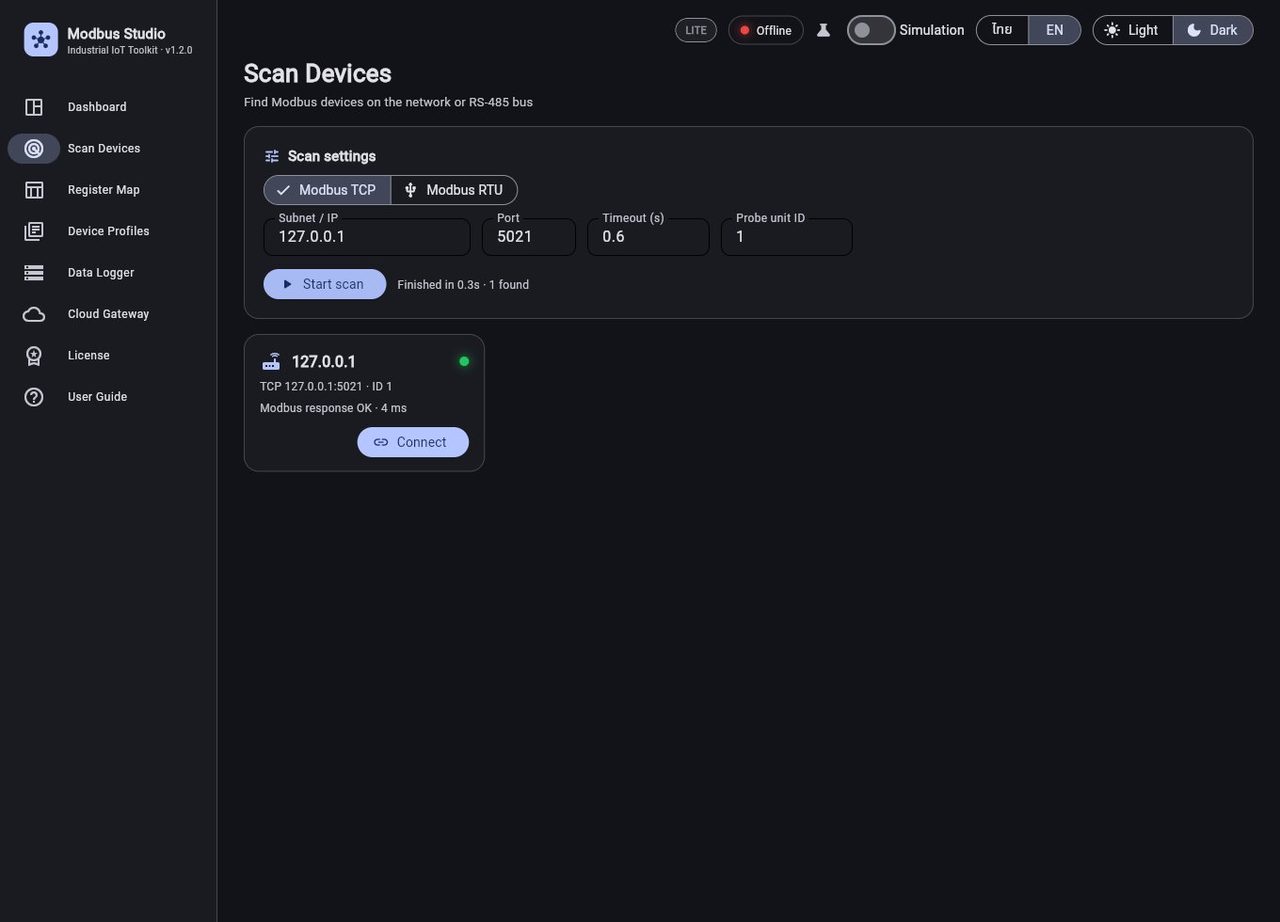
Find the device

Scans a whole Modbus TCP subnet at once, or finds RTU devices on RS-485 with automatic baud rate, parity and slave ID detection.

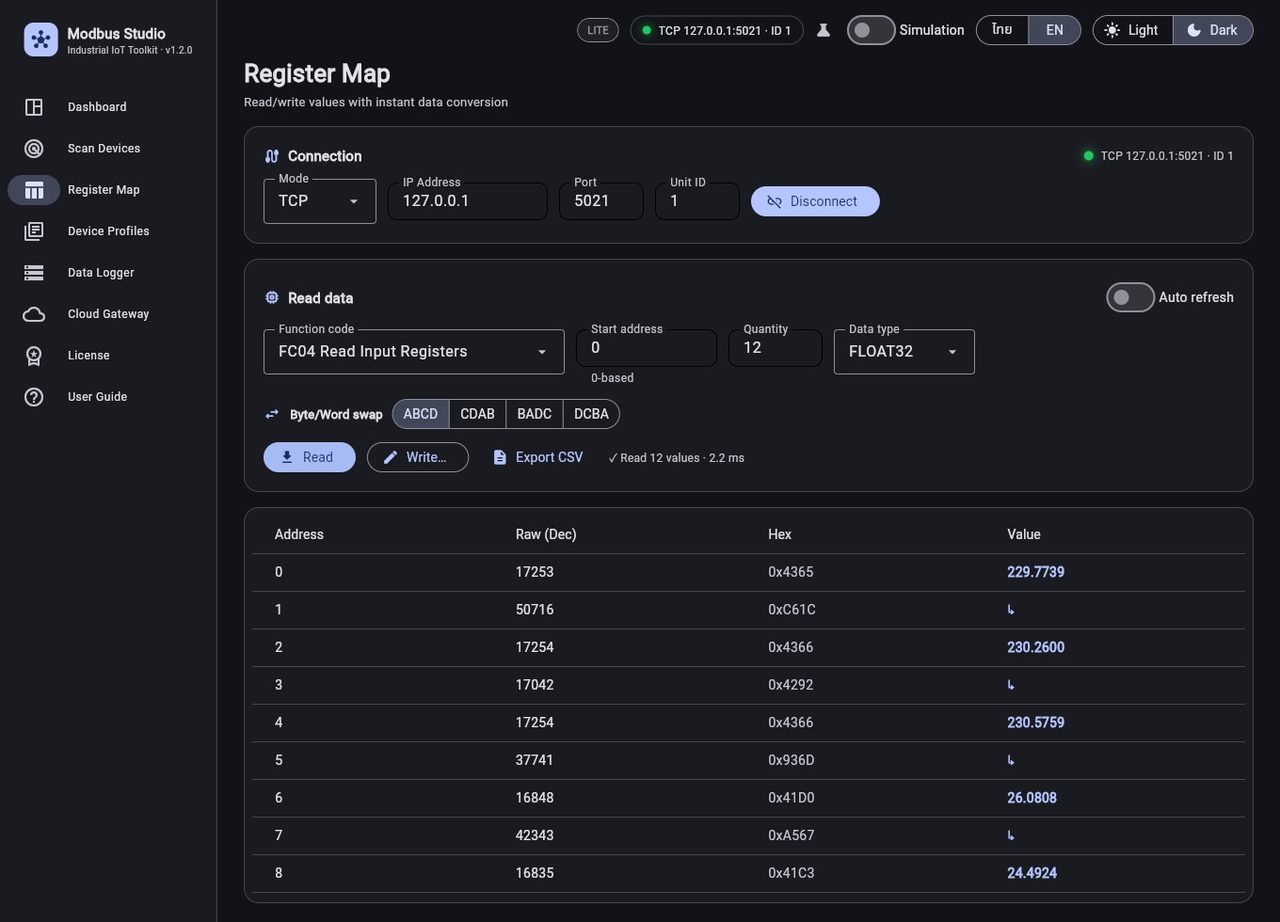
Register map

Read function codes 01–04, convert 16/32-bit integers and float32, swap byte and word order, and write with 05, 06, 15 and 16.

Live dashboard

KPI cards, a trend chart and gauges, built automatically from the tags of the chosen device profile.

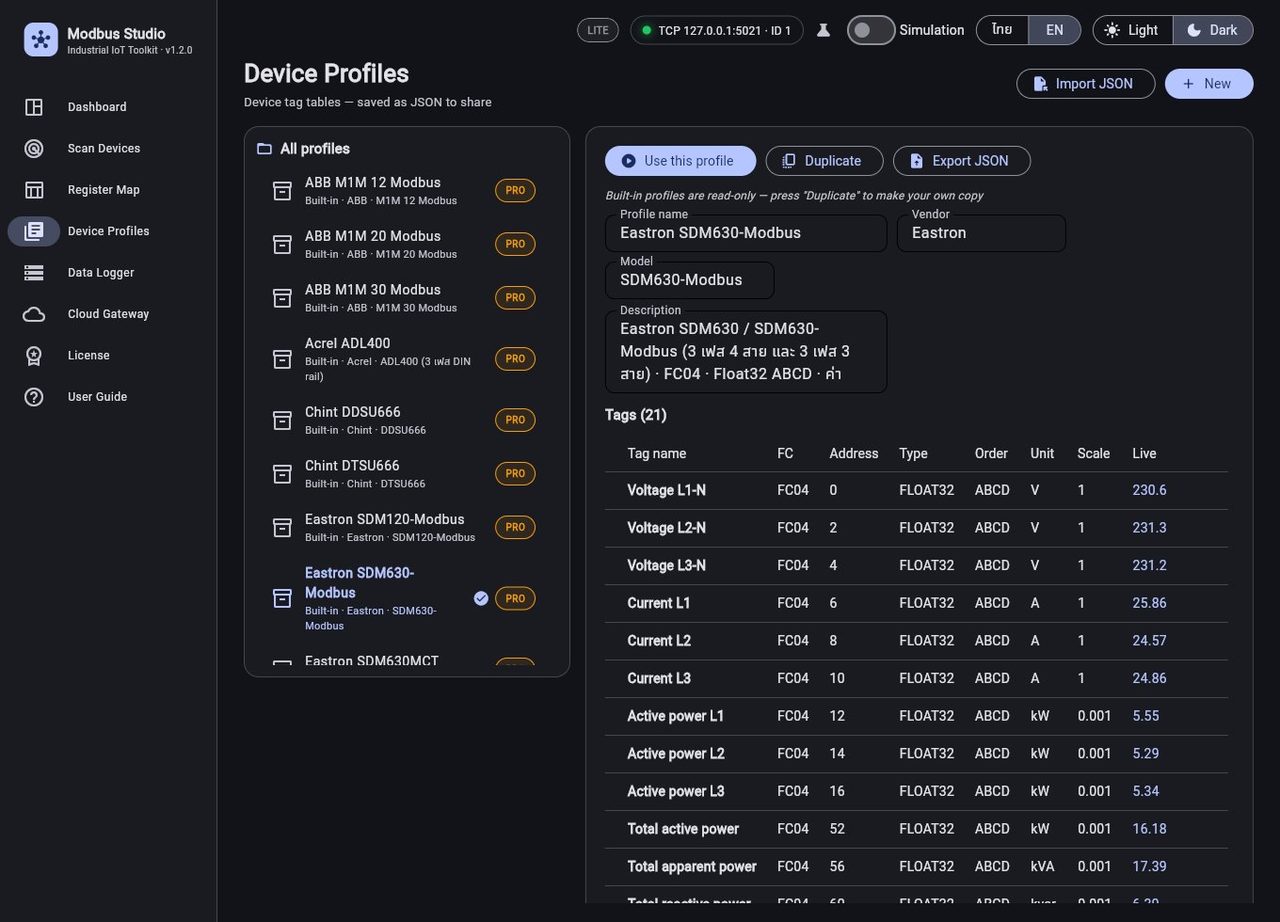
Device profiles

Save a device's tag table once and reuse it. Import and export JSON, and use the built-in library of meter and sensor profiles.

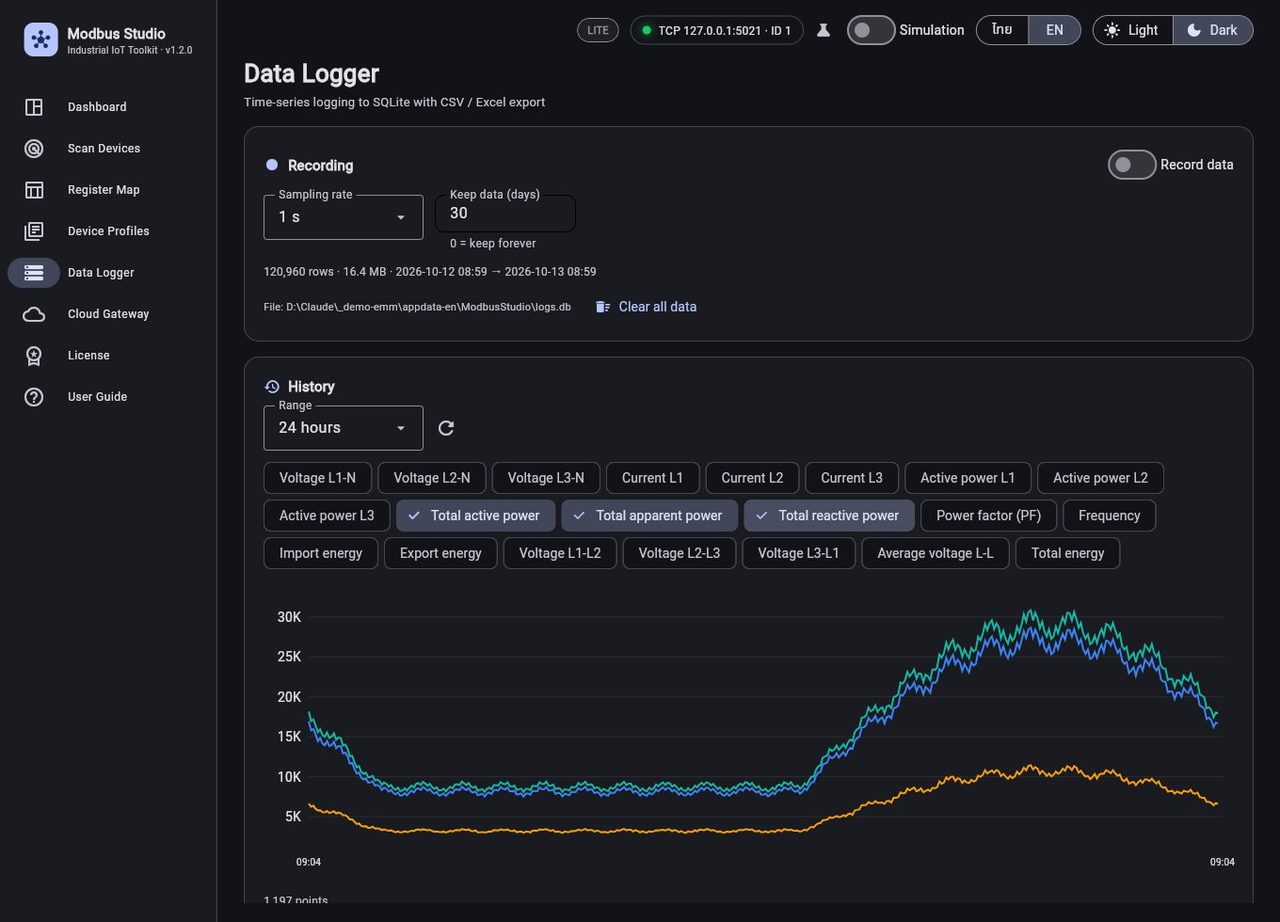
Data logger

Logs time series to a local SQLite file with automatic clean-up, and exports CSV or Excel.

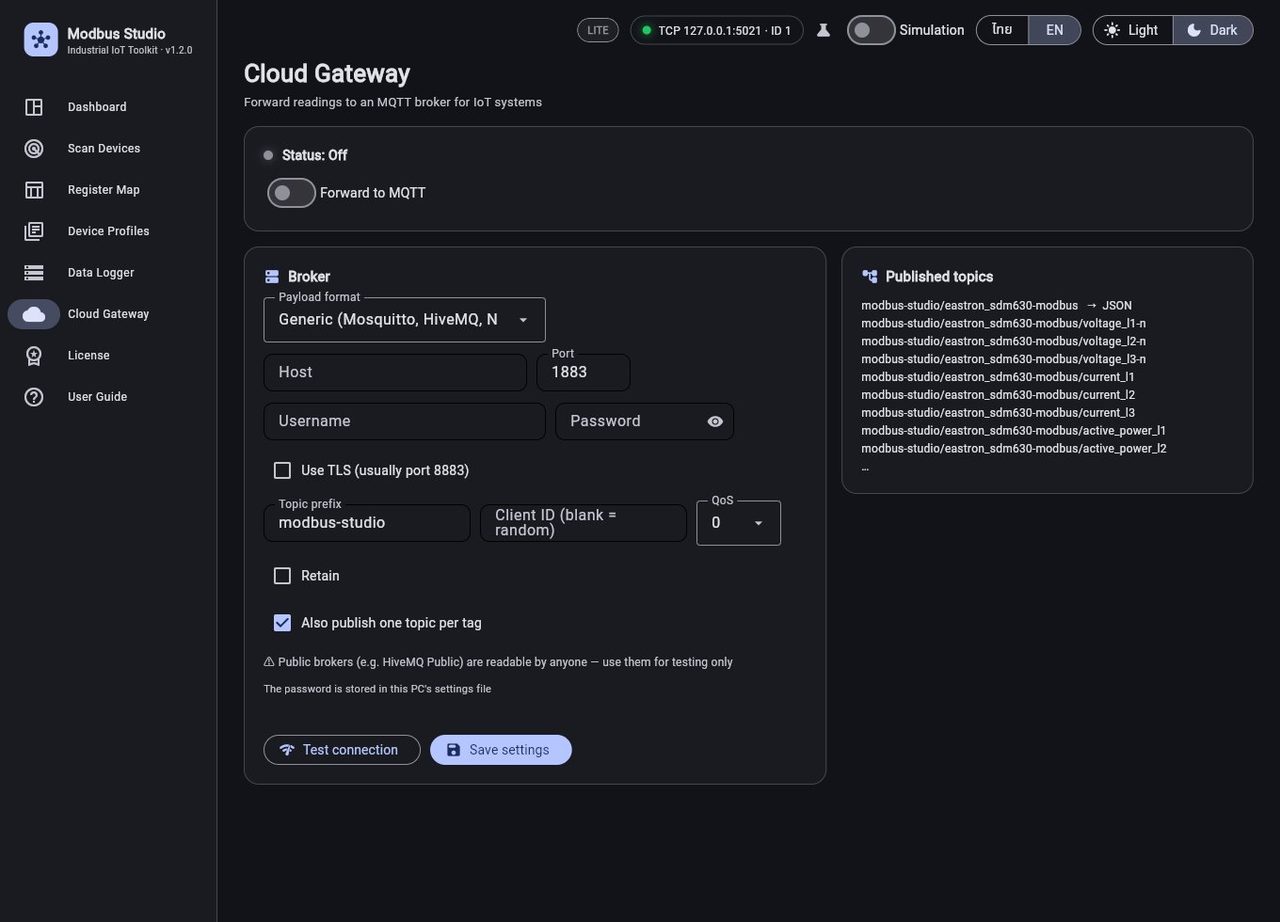
MQTT cloud gateway

Forwards readings to any MQTT broker, with TLS, per-tag topics and a ThingsBoard payload format.

Simulation mode

Try the whole program with a built-in virtual meter — no hardware needed.

Offline and bilingual

Thai or English, light or dark theme. License keys are checked offline — no cloud account and no monthly fee.

Runs on
Windows, with a Thai / English installer (no administrator rights needed)
Protocols
Modbus TCP and Modbus RTU (RS-485 / RS-232 via USB adapter)
License
Offline key tied to your PC's Machine ID
Try it
The Lite edition is free
Packages

Choose Your Edition

Both programs are sold as a one-time purchase, with no monthly fee.

JETNIPAT Energy — editions

Basic
Contact us for a quote
Up to 5 meters · 2 users

For a small site that needs to see and record its meters.

  • Read and record meters (Modbus RTU / ASCII / TCP)
  • History, charts and CSV export
  • Storage management and automatic backup
  • Alerts, electricity cost, reports, solar
  • EnPI and REST API
Request a quote
Enterprise
Contact us for a quote
Unlimited meters · unlimited users

For larger sites and energy-management programs.

  • Everything in Pro
  • EnPI: energy per unit, baseline and CUSUM savings
  • REST API to connect other systems
Request a quote

Every installation starts with a 30-day trial of all features. The license is a one-time purchase with no expiry and is not tied to one PC. Meter wiring, data logger and setup can be done by our engineers — see Energy Management System.

Modbus Studio — plans

Lite
Free

Try it out and basic reading

  • TCP scan · read FC01–04 · byte/word swap · simulation
  • Write values (FC05/06/15/16)
  • Modbus RTU (RS-485) scan
  • Device profiles (JSON) and CSV export
  • Data logger and Excel export
  • MQTT cloud gateway
  • Built-in meter profile library
  • Online training + 3 custom profiles
Ask for the installer
Standard
฿890

One-time, 1 PC, for field technicians. Updates for all 1.x versions.

  • TCP scan · read FC01–04 · byte/word swap · simulation
  • Write values (FC05/06/15/16)
  • Modbus RTU (RS-485) scan
  • Device profiles (JSON) and CSV export
  • Data logger and Excel export
  • MQTT cloud gateway
  • Built-in meter profile library
  • Online training + 3 custom profiles
Ask about Standard
Team
From ฿7,900

Pro for 5 PCs, with online training and 3 custom profiles.

  • TCP scan · read FC01–04 · byte/word swap · simulation
  • Write values (FC05/06/15/16)
  • Modbus RTU (RS-485) scan
  • Device profiles (JSON) and CSV export
  • Data logger and Excel export
  • MQTT cloud gateway
  • Built-in meter profile library
  • Online training + 3 custom profiles
Ask about Team

Prices are in Thai baht as of October 2026 and may change — contact us to confirm. Each license key is tied to the Machine ID of your PC (shown inside the program), and keys are checked offline.

Before You Ask

Frequently Asked Questions

Do I need the internet or a cloud account?
JETNIPAT Energy runs on your own PC or server and keeps the data in a local file; you open it from a browser on your network. Modbus Studio works fully offline. Sending data to a cloud (MQTT) is optional.
What hardware do I need to connect my meters?
Meters with an RS-485 port need a USB-to-RS-485 adapter or an RS-485-to-Ethernet gateway; Modbus TCP devices connect over the LAN. See our RS-485 wiring guide and Modbus gateway comparison.
Will it work with my meter?
Both programs work with devices that speak Modbus. Ready-made profiles are included for common meters and sensors, and other models can be added from the register map in the manual, with a test read before saving. Send us your model and we will confirm.
Can I try it before I buy?
Yes. JETNIPAT Energy gives a 30-day trial with all features, and the Lite edition of Modbus Studio is free.
Can you install and set it up for us?
Yes. Our engineers can fit the meters, wire the RS-485 bus, install a data logger and set up the software as part of our Energy Management System service.

Want to see it running on your meters?

Tell us about your site and the meters you use. We will recommend an edition and can set it up for you.

Contact Our Team