Gateways & Devices

Protocol Gateways for PLC Networks: Moxa MGate 5105-MB-EIP vs HMS Anybus

When a Modbus device must talk to a PLC on EtherNet/IP or PROFINET, a protocol gateway translates between the two. Here is how the main options differ.

A Modbus meter or drive cannot simply be plugged into a PROFINET or EtherNet/IP controller. A protocol gateway polls the Modbus device on one side and presents its data to the PLC on the other side as ordinary I/O. Two product lines dominate this job: Moxa's MGate 5 series and HMS's Anybus family. This is a desk-based comparison from public documentation, not a bench test.
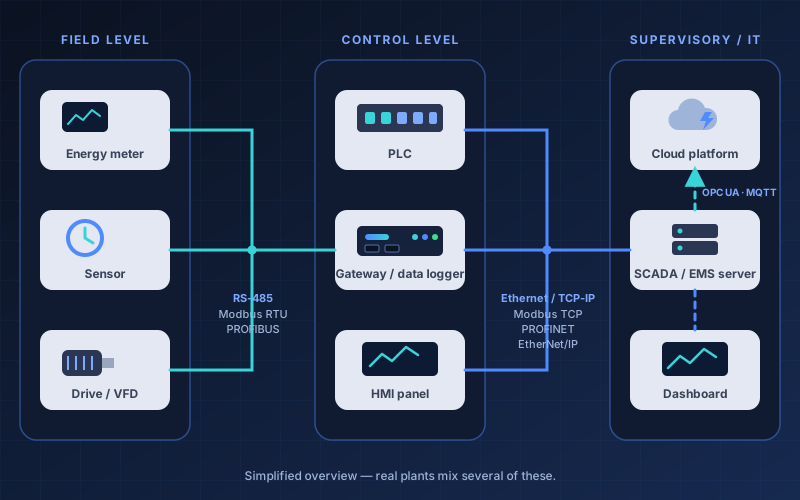
Diagram: field devices connect over RS-485, controllers over Ethernet, and supervisory systems and cloud over OPC UA or MQTT

Tap or click the diagram to enlarge it.

The Options

Three Ways to Bridge

Which one fits depends on what is on each side of the gateway.

Moxa MGate 5105-MB-EIP

One serial port and two Ethernet ports; converts Modbus to EtherNet/IP and can also publish to MQTT.

  • Modbus RTU/ASCII/TCP master or slave on one side, EtherNet/IP scanner or adapter on the other.
  • MQTT v3.1.1 with TLS, built-in Azure IoT Hub and Alibaba IoT Platform support, up to 300 tags.
  • microSD slot for configuration backup and buffering up to 2 GB if the cloud link drops.

HMS Anybus Communicator (ABC3090-A)

A serial master that presents RS-232/485 devices to a PLC on one chosen industrial Ethernet network.

  • Choose PROFINET, EtherCAT, EtherNet/IP or Modbus TCP by loading the matching firmware.
  • Modbus RTU master: up to 32 servers and 150 commands; up to 1500 bytes per direction.
  • Browser-based setup with drag-and-drop builders; secure boot, HTTPS and role-based access.

HMS Anybus X-gateway

A different job: it joins two networks (for example Modbus TCP and Modbus RTU, or EtherNet/IP and Modbus RTU) rather than polling serial devices.

  • Two interface modules plus a gateway platform that copies cyclic data between the networks.
  • Configured with Anybus Configuration Manager software or a built-in web page, without programming.
  • Order codes and data sizes differ per model, so check the exact variant on HMS's site.
Side by Side

MGate 5105-MB-EIP vs Anybus Communicator

The X-gateway is left out of the table because its figures vary by variant. Figures are from the maker pages under Sources.

SpecificationMoxa MGate 5105-MB-EIPHMS Anybus Communicator ABC3090-A
Main jobModbus (serial or TCP) to EtherNet/IP, plus MQTT publishingSerial master to one chosen industrial Ethernet network
PLC sideEtherNet/IP scanner or adapterPROFINET, EtherCAT, EtherNet/IP or Modbus TCP, set by firmware
Serial side1 port, RS-232/422/485 with 2 kV isolation; Modbus master or slaveRS-232/RS-485; Modbus RTU master, up to 32 servers (its spec table says 31), 150 commands
Data sizeModbus: 100 commands, 2048 bytes in/out. EtherNet/IP: 496 bytes in/outUp to 1500 bytes per direction, depending on the network
Cloud / MQTTMQTT v3.1.1, TLS, 300 tags; Azure IoT Hub and Alibaba built inNot listed on the product page
ConfigurationSee Moxa's manual (not covered on the page we read)Web interface, drag-and-drop frame and transaction builders, no software to install
Supply12–48 VDC, dual redundant inputs12–30 VDC
Temperature0 to 60 °C; -T version −40 to 75 °C−25 to 70 °C
HousingMetal, IP30PC/ABS, IP20, DIN-rail
Certifications listedATEX, IECEx, UL, CE; Class I Division 2CE, UL, KC
Warranty5 years5 years
Planning

Questions to Settle Before Ordering

Most gateway projects stall on these, not on the hardware.

This is a desk-based comparison using the manufacturers' public documentation, read in October 2026. We did not bench-test these units for this article. Specifications, firmware and model status change, and even a manufacturer's own pages can disagree — always confirm in the current datasheet before you specify or buy. Brand and product names belong to their owners; mention here is not an endorsement.

Connecting Modbus devices to a PLC?

Tell us what devices you need to connect and we will recommend a gateway and a wiring plan.

Contact Our Team