Industrial Communication

Industrial Communication Protocols Explained: A Plain-Language Guide

Meters, drives, PLCs and software need a shared language to exchange data. Here are the common industrial protocols, what they run on, and how to choose between them.

A protocol is an agreed set of rules for how devices ask for data, answer, and check for errors. The wiring (the physical layer) and the protocol (the language) are separate decisions, but they must match on both devices. This guide is a map of the most common choices in factories; the next articles go deeper on Modbus, RS-485 wiring and Ethernet.
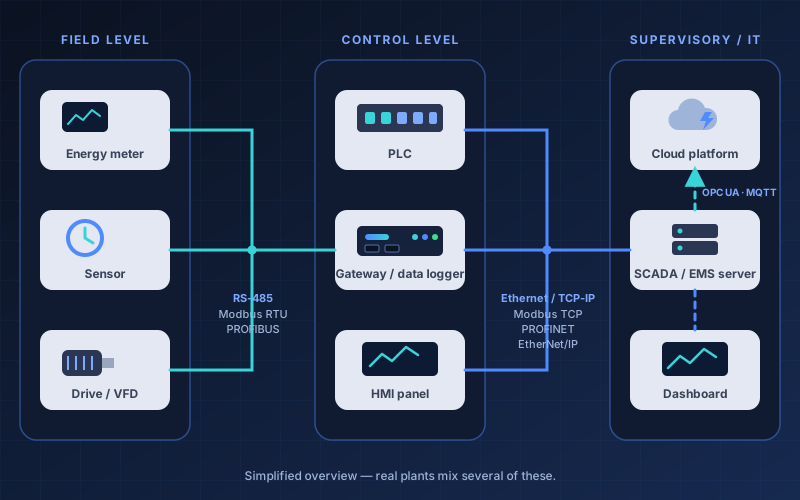
Diagram: field devices connect over RS-485, controllers over Ethernet, and supervisory systems and cloud over OPC UA or MQTT

Tap or click the diagram to enlarge it.

The Main Players

Six Protocols You Will Meet

Each has a home territory. None is best everywhere.

Modbus RTU

Master and slave over a serial line, usually RS-485. Simple, and supported by a huge range of meters, sensors and drives.

Modbus TCP

The same Modbus data model carried over Ethernet, normally on TCP port 502.

PROFIBUS and PROFINET

PROFIBUS is a serial fieldbus; PROFINET is its Ethernet-based counterpart. Both are managed by PROFIBUS & PROFINET International and are common in plants that use Siemens PLCs.

EtherNet/IP

An Ethernet-based protocol built on the Common Industrial Protocol (CIP), managed by ODVA and common with Rockwell Automation (Allen-Bradley) PLCs.

OPC UA

A vendor-neutral, platform-independent standard from the OPC Foundation for exchanging data between machines and IT systems, with security built in.

MQTT

A lightweight publish/subscribe messaging protocol, often used to send data from a site up to cloud or IT platforms.

How to Choose

A Practical Way to Decide

Start from the equipment you already have, not from the protocol list.

This article is a general overview. Brand associations (for example PROFINET with Siemens) are typical, not exclusive. Always confirm what a specific device supports in its manual.

Need help connecting mixed equipment?

Tell us what devices you have and we will recommend a communication plan.

Contact Our Team