Industrial Communication

Modbus RTU vs Modbus TCP Explained: Registers, Function Codes and Common Pitfalls

Modbus is the most common language between meters, sensors, drives and software. Here is how it works, how RTU and TCP differ, and why a device can be wired perfectly and still not answer.

Modbus was first published by Modicon in 1979 and is now an open standard maintained by the Modbus Organization. It uses a simple request-and-response model: one master (also called the client) asks, and a slave (the server) answers. That simplicity is why you find it on almost every energy meter.
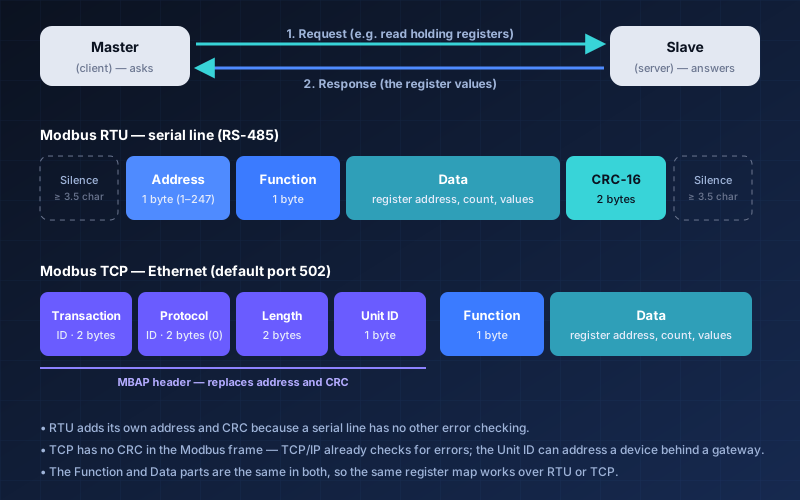
Diagram: Modbus RTU frame with address, function, data and CRC, and Modbus TCP frame with MBAP header, function and data

Tap or click the diagram to enlarge it.

Three Flavours

RTU, ASCII and TCP

The data model is the same. Only the way it is carried differs.

Modbus RTU

Compact binary frames over a serial line (usually RS-485), checked with a 16-bit CRC. Frames are separated by a silent gap of at least 3.5 character times.

Modbus ASCII

Human-readable text frames over serial, checked with an LRC. Rare today, but still found on some older devices.

Modbus TCP

Modbus carried inside TCP/IP over Ethernet, normally on port 502. A short MBAP header replaces the address and CRC; TCP itself provides error checking.

Data Model

The Four Data Types

Every Modbus device exposes its data as one of four tables. The classic numbering is shown in brackets.

Requests

Function Codes You Will Use Most

The function code tells the slave what to do.

Troubleshooting

Why Will It Not Answer?

Check these in order before blaming the device.

RTU or TCP? Many meters offer RS-485 only. A gateway or data logger can convert Modbus RTU to Modbus TCP so software on the network can read them.

Electrical work should be done by qualified people with the equipment switched off and locked out. Always follow the device manuals; this article is general guidance, not a design for your site.

Struggling to connect a device over Modbus?

Talk to our engineers about connecting your meters and devices.

Contact Our Team